FAQs

FAQs about BioSolveIT Technology

Our FAQ section is like your shortcut key to BioSolveIT know‑how. It bundles the most common questions (and their answers) so you can understand concepts in minutes instead of hours.

Quick Links

What would you like to do? Link
Where can I download the Chemical Spaces? Download
Where can I download the BioSolveIT software? Download
Where can I get an evaluation license for a two-week free trial? Request License
Combinatorial Chemical Spaces

What are Chemical Spaces?

Combinatorial Chemical Spaces represent vast collections of potential molecules defined by chemical reaction rules and building blocks, rather than listing each compound explicitly (as in enumerated libraries). These spaces are not stored as complete molecule lists, but instead as molecule blueprints that specify how building blocks can be connected to generate real, synthesizable compounds.
  • Massive scale, minimal storage: Enumerating all possible compounds would be computationally and logistically infeasible at large scale (e.g., billions or trillions of molecules). Combinatorial spaces encode the same chemical diversity much more compactly.
  • Real-time assembly: Compounds are constructed virtually on demand, only when a query is made — no need to store the full list of molecules in advance.
  • Synthetic feasibility by design: Since these Spaces are created from known chemical reactions and purchasable building blocks, hits retrieved from the space are, in principle, readily synthesizable.
Chemical Spaces are a proprietary BioSolveIT format (.space files) that can be searched using our technology. Of course, one could use combinatorial approaches to generate an enumerated list of all possible building block combinations (billions or trillions) in SD format to use in other tools. However, this would come at the cost of significantly reduced speed and a loss of efficiency.
  • Tools like infiniSee and SeeSAR with Chemical Space Docking® search these combinatorial Chemical Spaces efficiently by building and scoring molecules dynamically without full enumeration.
  • In ligand-based approaches employed in infiniSee, molecules are ranked by similarity to a query (e.g., a known active compound), using proprietary algorithms optimized for speed and accuracy. Users can requests a desired number of top ranking compounds to retrieve from the investigated Chemical Space(s).
  • If an exact match isn’t available, the system provides close analogs maintaining chemical relevance while ensuring synthesizability.
Chemical Spaces provided by BioSolveIT are surprisingly compact typically in the single-digit gigabyte range, even though they represent billions to trillions of possible molecules.

For comparison: an enumerated set of 5 trillion molecules (with SMILES only!) would conservatively be around 100–200 TB in size — and that’s already factoring in compression and indexing.

This means BioSolveIT's Chemical Spaces are over 10,000 times smaller in storage while providing access to the same (or even greater) chemical diversity.
Let’s compare Chemical Spaces to sauerkraut. The concept of fermented cabbage exists in many world cuisines; kimchi in Korea, kapusta kiszona in Poland, curtido in El Salvador. Although they follow similar preparational steps, the taste varies greatly due to the local ingredients used. Chemical Spaces behave alike: The knowledge and building blocks used to build up the Chemical Space differ between companies and methods involved. The overlaps between two Chemical Spaces can be surprisingly miniscule (Lessel et al. 2019 and Rarey et al. 2021).
By searching in several Chemical Spaces you will maximize your success rate to find a diverse, promising molecules.
infiniSee, as a Chemical Space navigation platform, offers several competitive advantages over other similarity calculators, primarily stemming from its ability to efficiently explore and navigate ultra-large, combinatorial Chemical Spaces.
  • Ability to handle massive scale on standard hardware: infiniSee allows you to screen billion or even trillion-sized Chemical Spaces on your own standard hardware, eliminating the need for server farms, expensive cloud computing, or supercomputers. This is a significant distinction from traditional methods that require enormous computational resources for large libraries or reliance on third parties and services.
  • Compounds are generated on-the-fly during a search, meaning an extensive list of all contained compounds does not exist, and computational power is not wasted on low-scoring candidates. This leads to super-fast solution finding.
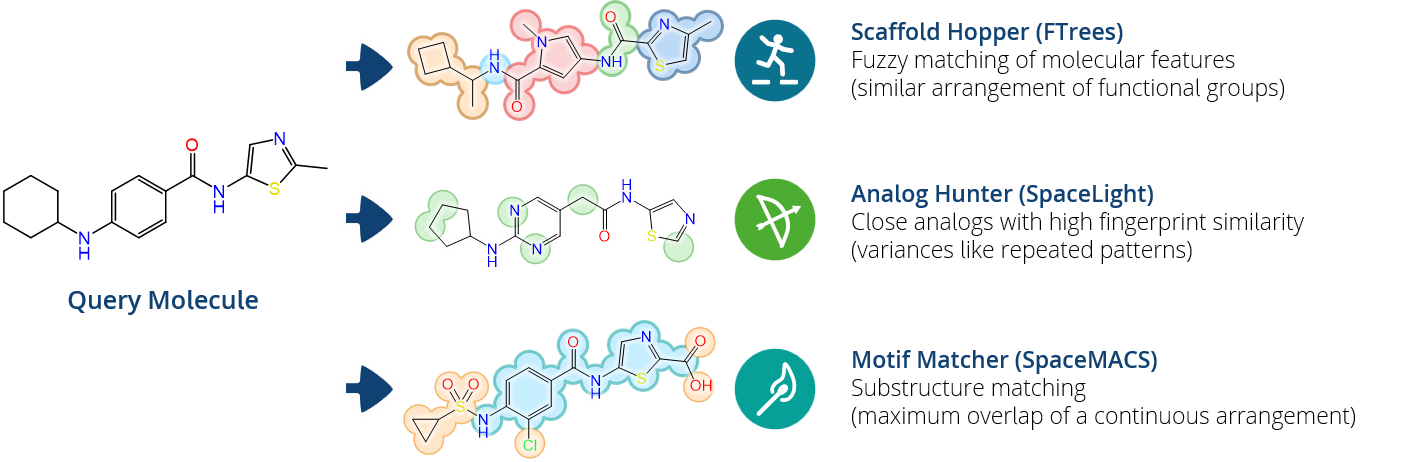
  • Orthogonal search methods for comprehensive chemical space coverage: infiniSee offers a "Trinity of Compound Mining" with distinct and complementary search methods, each tailored to different drug discovery challenges, allowing for a broader exploration of chemical space and retrieval of novel intellectual property (IP):
    • Analog Hunter (SpaceLight):Retrieves close analogs based on molecular fingerprint similarity (e.g., ECFP4, CSFP variants), ideal for exploring structure-activity relationships (SARs) around a molecule of interest.
    • Scaffold Hopper (FTrees):Performs fuzzy pharmacophore matching of molecular features to find distant neighbors and novel scaffolds that might be missed by other methods relying on strict atom connectivity.
    • Motif Matcher (SpaceMACS): Conducts maximum common substructure (MCS) searches and exact substructure matching, as well as R-group searches, crucial for fragment-based drug discovery (FBDD) and substructure-driven campaigns. SpaceMACS supports SMARTS definitions for precise targeting
    • This orthogonality means infiniSee explores different areas of chemical space, delivering chemically diverse compounds and overcoming the limitations of single-similarity metrics
  • Synthethically accessible and purchasable results: Compounds identified by infiniSee are synthetically accessible by design (typically in one or two steps) because they are built from predefined building blocks and chemical reactions.
    BioSolveIT collaborates with various compound suppliers (e.g., Enamine, Ambinter, WuXi AppTec, OTAVA, Chemspace, eMolecules) to provide access to a wide array of Chemical Spaces, and identified compounds can be directly ordered
  • Proven track record and benchmarks: BioSolveIT's technology, including infiniSee's underlying algorithms, has a long-standing expertise and collaboration history with leading pharmaceutical companies and academia, with success acknowledged in peer-reviewed publications.
    Benchmarks demonstrate that infiniSee's search methods are significantly faster than traditional enumerated library screening and retrieve a higher percentage of relevant and chemically diverse compounds. For example, FTrees can be up to 1.5 × 10⁷ times faster than traditional methods
  • Integration and user-friendliness: nfiniSee integrates with other BioSolveIT tools, offering a comprehensive solution for drug discovery workflows.
    The platform is designed to be user-friendly, "fast, visual, and easy," catering to both beginners and veterans in drug design, facilitating on-the-fly ideation and decision-making.
  • Custom Chemical Space creation (with CoLibri): infiniSee is complemented by CoLibri, a command-line toolkit that allows users to create their own ultra-vast Chemical Spaces using in-house building blocks and reaction rules. This enables companies to capture their own intellectual property and synthetic know-how, providing a unique and valuable resource.
After performing a search with infiniSee your results will be presented in a table. The column "Source" tells you the origin of the Chemical Space that contains your solution; the ID of the respective result molecule is shown in the "Name" column.
Compounds can be ordered by sending a quote request to the compound vendor with the following information:
Requested structures in SMILES or SD format, Compound ID (concatenated), and amount requested.

For compounds from Ambinter's AMBrosia Space, send your request to ambrosia@greenpharma.com.
For compounds from eMolecule's eXplore Space, send your request to explore@emolecules.com.
For compounds from Enamine's REAL Space, send your request to libraries@enamine.net.
For compounds from WuXi's GalaXi Space please send your request to contact@labnetwork.com
For compounds from OTAVA's CHEMriya Space please send your request to info@otava.ca.
For compounds from Chemspace's Freedom Space please send your request to sales@chem-space.com.
Next Generation Virtual Screening:
Chemical Space Docking®

What is Chemical Space Docking® (C-S-D) and how does it differ from standard virtual screening methods?

C-S-D is the next generation of structure-based virtual screening that efficiently mines promising hit candidates from ultra-large Chemical Spaces. Unlike standard virtual screening, which screens pre-enumerated libraries, C-S-D generates compounds on the fly, allowing for the exploration of billions or trillions of compounds without the need for server farms or expensive cloud computing.

C-S-D uses the same principles as standard virtual screening, namely the prediction of binding modes and the assessment of interaction qualities with the target. The revolution comes with the sequential build up of compounds within the binding site where only the most promising candidates are followed up with. This reduces computational costs and accelerates the whole process my several orders of magnitude.

You can learn more about C-S-D following this link.

What is a synthon?

Synthons are the smallest, conceptual units of pre-processed building blocks of a Chemical Space that contain an extension vector.[1], [2], [3] Synthons are derived from building blocks and an individual building block can lead to more than one distinct synthon if it contains functional groups compatible with different reactions. They serve as the starting points for growing into larger, more complete drug candidates during a C-S-D workflow.

How is the synthon strategy employed in C-S-D?

The synthon strategy in C-S-D begins by docking pre-processed building blocks (synthons) of a selected Chemical Space into the target's binding site. The smallest units containing an extension vector are assessed for their interaction potential. Users then select promising candidates, which are subsequently grown into complete drug candidates by applying encoded chemical reactions.

What types of targets or binding sites are best suited for C‑S‑D?

C‑S‑D™ works best for targets with a well‑defined 3D binding site and structural information available, typically from X‑ray crystallography, cryo‑EM, or high‑quality homology models. It is particularly effective when the pocket can accommodate fragment‑based growth from an anchored substructure. While C‑S‑D can be applied to a wide variety of proteins, it is especially valuable for kinases, GPCRs, and enzyme active sites. However, it is also possible to work with RNA or DNA structures or their complexes.

What is the purpose of applying linker constraints in C-S-D?

Linker constraints in C-S-D are applied to guide the pose generation process. They act as chemically inert phantom atoms (like an ethyl group) that sample clashes with the target surface, helping to define the extension direction and avoid placing new chemical groups in unfavorable, dead-end positions.

Can template molecules be used in C-S-D?
What advantages does this offer?

Template molecules in C-S-D, such as co-complexed ligands, can be used to serve as a seed to guide the anchoring step. This helps to preserve molecular motifs and key interactions in the generated poses. A minimum common substructure of five atoms is required for matching.
The template-based approach not only maintains the integrity of the original binding mode during fragment extension steps but also significantly reduces computation time by focusing the search on relevant, experimentally validated orientations.

How long does a C-S-D run take?

For a example run with Enamine's REAL Space (7.6 × 10¹¹ compounds on 9 computing units), the full C‑S‑D workflow took about 49 hours. The run was performed on 9 computing units, each with 64 GB of RAM and 32 processing cores (288 cores in total).

What are the main advantages of using C-S-D compared to traditional virtual screening methods?

C-S-D offers several key advantages over traditional virtual screening:
  • Massive scale without full enumeration: Screens billion‑ to trillion‑sized Chemical Spaces in days on standard hardware by dynamically generating only the most promising molecules, avoiding the need to dock every compound in a pre‑built library.
  • Speed and efficiency: Multiple orders of magnitude faster than conventional docking; computation is focused on relevant chemical regions instead of wasting time on unlikely candidates.
  • Template‑guided precision: Optional use of template molecules preserves key molecular motifs and binding interactions, maintains the original binding mode during fragment growth, and accelerates docking through guided anchoring and extension.
  • Synthetic feasibility: Searches are performed directly within synthetically accessible combinatorial Chemical Spaces, ensuring hits can be readily made in the lab.
  • Iterative optimization within the workflow: Better‑scoring molecules are generated step‑by‑step, enabling rapid enrichment toward high‑quality candidates without multiple separate screening rounds.
  • Hardware accessibility: Runs efficiently on standard high‑performance workstations. No supercomputer or massive IT infrastructure required.
C-S-D searches reaction-defined combinatorial spaces directly. It first docks a comparatively small collection of synthons and only generates products derived from promising anchors. Its computational scaling therefore depends much more strongly on the number of reagents than on the combinatorial number of possible products.

In the original ROCK1 study, C-S-D retrieved a substantial fraction of the highest-scoring molecules at a small fraction of the cost of fully enumerated brute-force docking. However, it is important to communicate that C-S-D does not explicitly dock every possible final product; some high-scoring products can be lost during early synthon filtering.
Conventional brute-force workflows require every molecule to be:
  • enumerated
  • standardized and protonated
  • converted into three-dimensional conformations
  • stored
  • docked
  • and retained or discarded afterward
This creates large preparation, compute, orchestration, and storage costs before the first candidate is selected. C-S-D postpones product generation until promising chemistry has already been identified.

The original publication reports that the method scales roughly with the number of reagents spanning the Chemical Space and is therefore multiple orders of magnitude faster than conventional full-library docking in the investigated setting.
Machine-learning and active-learning approaches usually dock a training sample, learn a surrogate model, predict the remainder of the library, and then explicitly dock only the predicted top subset. For example, one recent workflow trained on one million docked compounds and noted that its effectiveness was target-dependent. C-S-D does not require:
  • an initial million-compound training screen
  • a target-specific predictive model
  • iterative model retraining
  • or extrapolation from a sampled subset to the rest of the library
Instead, docking remains the selection principle throughout anchoring and extension.

This does not eliminate docking-score limitations, but it avoids an additional layer of surrogate-model uncertainty.
C-S-D docks the actual synthon equipped with a chemically neutral extension marker, or dummy atom. The initial binding mode is therefore not influenced by an arbitrarily selected reaction partner or smallest complete product.

The extension vector also provides information about the direction in which the molecule must grow and can help identify anchor poses that would result in clashes during later extension. BioSolveIT additionally supports template-guided placement and pharmacophore constraints during anchoring and extension.

Compared with V-SYNTHES, the methodological distinction is:
Chemical Space Docking® V-SYNTHES2
Real synthon with a neutral extension marker Minimal Enumeration Library product
Optional ligand-template support Geometry-based CapSelect
Pharmacophore constraints during anchoring and extension Automated pose-productivity selection
Interactive review in SeeSAR Automated cluster-oriented workflow
C-S-D does not simply identify a fragment and subsequently redock unrelated final products from scratch. The selected synthon is extended while retaining its original interaction pattern and orientation.

This helps connect:
  • the reason an anchor was selected
  • the direction in which it grows
  • the additional interactions introduced during extension
  • and the final binding hypothesis
The workflow can also be guided by ligand templates and desired or undesired pharmacophore interactions.
The defining reactions and compatible building blocks are encoded directly in the Chemical Space. Final compounds are therefore created according to known reaction rules rather than generated as unconstrained hypothetical structures.

For partner Spaces, the results are not merely predicted to be synthesizable: they can be submitted to the respective vendor for make-on-demand synthesis. Reaction and building-block information also provide a direct route from virtual candidate to physical compound.
C-S-D is not limited to one enumerated database or one compound supplier. BioSolveIT currently provides access to several partner Spaces spanning billions to trillions of products, based on different building blocks and reaction portfolios.

The practical advantage is not only a larger total number. Different Spaces can provide:
  • alternative scaffolds
  • different reaction chemistries
  • different substitution patterns
  • additional close analogues
  • supplier flexibility
  • and potentially shorter or less expensive procurement routes
This remains a strong differentiator against workflows developed around a particular release of a single collection. The current V-SYNTHES2 implementation, for example, is principally presented around Enamine REAL and experimental xREAL data.
C-S-D does not optimize the number of full molecules docked. It optimizes the amount of relevant Chemical Space that can be considered within a practical budget.
  • Brute-force docking evaluates 10 million complete structures for $30,000.
  • C-S-D accesses a 70-billion-product Space for $5,000. This translates into 42,000× more Chemical Space accessible per dollar
C-S-D has not only been demonstrated retrospectively.

In the ROCK1 campaign:
  • almost one billion products were explored
  • 69 compounds were purchased
  • 27 had Ki values below 10 µM
  • and two crystallographic structures confirmed the predicted poses
In the PKA fragment-growing campaign:
  • 93 selected molecules were successfully synthesized
  • 40 were active in at least one validation assay
  • the best follow-up improved affinity by 13,500-fold
  • and the campaign was completed in nine weeks
C-S-D is integrated into an operational environment including:
  • SeeSAR for setup, visualization, and medicinal-chemistry review
  • HPSee for workload execution and shared infrastructure
  • prepared Chemical Space files
  • pharmacophore and template support
  • standardized result data
  • and commercial technical support
The calculations can be conducted on customer-controlled infrastructure, keeping targets, queries, and results within the organization.

C-S-D Performance

C-S-D completed an end-to-end structure-based exploration of a 76-billion-compound REAL Space in 49 h 19 min 12 s, using nine compute nodes with 32 CPU cores each, corresponding to 288 CPU cores in total. The workflow docked approximately 370,000 candidates during anchoring, 8.6 million during the first extension, and 1.7 million during the second extension, giving a stage-summed total of 10.67 million docked candidates.

This means that explicit docking was restricted to approximately 0.014% of the complete Chemical Space. In other words, C-S-D reduced the number of compounds requiring docking by approximately 99.986%, or by a factor of roughly 7,100, compared with brute-force docking of all 76 billion products.

The wall-clock runtime corresponds to approximately 14,204 core-hours, calculated as 49.32 hours × 288 cores. For rough cross-benchmark normalization, this equals approximately 187 core-hours per billion nominal Chemical Space products, or 1,331 core-hours per million docking operations.
Space Tools
(FTrees, SpaceLight, SpaceMACS)

Speed of Chemical Space Exploration Tools

Answer ECFP4 is the fastest method in the benchmark, averaging approximately 31 milliseconds per query across the six combinatorial Chemical Spaces. It is around 1.4× faster than fCSFP4, 1.7× faster than SpaceMACS, and 5.1× faster than FTrees.
Comparison based on [a benchmark publication].

Rank Method Search type Mean runtime per query Relative to ECFP4 Assessment
Performance Across Six Combinatorial Chemical Spaces
1 ECFP4 Fingerprint similarity 0.031 s Fastest Best overall runtime performance. Results are returned within approximately 31 milliseconds per query on average.
2 fCSFP4 Feature-enriched fingerprint similarity 0.045 s 1.4× slower Only moderately slower than ECFP4 while incorporating additional feature information.
3 SpaceMACS Maximum common substructure similarity 0.053 s 1.7× slower Provides more structurally explicit similarity searching while retaining millisecond-scale runtimes.
4 FTrees Fuzzy pharmacophore similarity 0.160 s 5.1× slower The slowest of the four methods, but offers a more abstract scaffold-hopping search that cannot be replaced directly by fingerprint similarity.
Benchmark scope: Mean runtimes were calculated across REAL, GalaXi, Freedom Space, eXplore, CHEMriya, and AMBrosia using 2,917 query molecules per Chemical Space. ECFP4 was the fastest or joint-fastest method in every collection included in the complete benchmark.
BioSolveIT Search Performance by Collection Type and Size
Comparison based on [a benchmark publication].
Summary: After accounting for collection size, ECFP4 is the fastest method for both enumerated libraries and combinatorial Chemical Spaces. On enumerated libraries, fCSFP4 performs almost identically, while ECFP4 retains a clearer advantage over fCSFP4, SpaceMACS, and FTrees in combinatorial spaces.

Method Search type Collection-size range Total runtime range Size-normalized runtime Relative performance
Enumerated Libraries: Molport, Mcule, Life Chemicals, and ChemDiv
ECFP4 Fingerprint similarity 0.15–5.9 × 10⁶ 9–330 s 54.7 s per 106 compounds Fastest. Provides the lowest collection-size-adjusted runtime.
fCSFP4 Feature-enriched fingerprint similarity 0.15–5.9 × 10⁶ 9–344 s 56.0 s per 106 compounds Approximately 1.02× slower than ECFP4 and effectively comparable in runtime.
FTrees Fuzzy pharmacophore similarity 0.15–5.9 × 10⁶ 271–14,397 s 1,843 s per 106 compounds Approximately 34× slower than ECFP4 after adjusting for library size.
SpaceMACS Maximum common substructure similarity 0.15–5.9 × 10⁶ 1,205–41,501 s 6,793 s per 106 compounds Approximately 124× slower than ECFP4 on explicitly enumerated libraries.
Combinatorial Chemical Spaces: REAL, GalaXi, Freedom Space, eXplore, CHEMriya, and AMBrosia
ECFP4 Fingerprint similarity 0.51 × 10⁹–5.0 × 10¹² 11–343 s 1.09 s per 109 nominal products Fastest. Offers the best overall size-adjusted performance in combinatorial spaces.
fCSFP4 Feature-enriched fingerprint similarity 0.51 × 10⁹–5.0 × 10¹² 13–507 s 1.45 s per 109 nominal products Approximately 1.3× slower than ECFP4 after adjusting for space size.
SpaceMACS Maximum common substructure similarity 0.51 × 10⁹–5.0 × 10¹² 25–357 s 2.99 s per 109 nominal products Approximately 2.8× slower than ECFP4, but markedly more competitive than on enumerated libraries.
FTrees Fuzzy pharmacophore similarity 0.51 × 10⁹–5.0 × 10¹² 119–1,386 s 8.67 s per 109 nominal products Approximately 8.0× slower than ECFP4 after adjusting for nominal Chemical Space size.
Calculation: Size-normalized runtime = total runtime for all 2,917 queries ÷ collection size. Values shown are geometric means across the collections in each category. Enumerated libraries are normalized to one million stored compounds, while combinatorial spaces are normalized to one billion nominal products.

Important: The nominal size of a combinatorial Chemical Space does not represent the number of molecules individually enumerated or inspected during a search. These values describe collection-size-normalized benchmark performance and should not be interpreted as literal compound-processing rates.
[Last updated: 2026-07-29]


General Comparison

Comparison Closest search types BioSolveIT runtime Competitor runtime Indicative advantage Core conclusion
Reported Performance Comparison
BioSolveIT vs RDKit Fingerprint similarity and substructure-oriented synthon searching 0.031–0.053 s ~0.25–1.5 s
Substructure
<10 s
Fingerprint
~5–30×
Substructure
>100×
Fingerprint
BioSolveIT provides substantially higher throughput, particularly for fingerprint similarity searching.
BioSolveIT vs NextMove Arthor Fingerprint similarity and structure or SMARTS searching 0.031–0.053 s ~0.10–0.49 s
Fingerprint
<8 s
Worst-case SMARTS
~3–16×
Fingerprint
Up to ~150×
SMARTS comparison
Arthor achieves high enumerated-library throughput, but its peak benchmarks use considerably greater CPU and memory resources.
BioSolveIT vs Alipheron Fingerprint, similarity, and substructure-oriented Chemical Space searching 0.031–0.053 s 2.0 s median
HyperSpace
~38–65× Both platforms provide interactive Chemical Space searching, but BioSolveIT reports markedly shorter runtimes for repeated 2D searches.
Important: These values originate from different publications, hardware configurations, Chemical Spaces, query sets, search definitions, hit rates, and result limits. They provide an indicative comparison rather than a controlled head-to-head benchmark. Full benchmark details, CPU context, methodological differences, and individual limitations are provided in the detailed comparison tables below.


BioSolveIT vs RDKit Synthon Search
Comparison based on reported performancey by [BioSolveIT] and [RDKit Synthon Search].
Summary: BioSolveIT’s Chemical Space search tools are approximately 5–30× faster than RDKit for substructure-oriented searches and potentially more than 100× faster for fingerprint similarity searches. The exact advantage varies with query complexity, hit count, database composition, hardware, and the number of requested results.

Software Search method Search type Runtime per query Runtime for 2,917 queries Interpretation
BioSolveIT Chemical Space Search
BioSolveIT ECFP4 Fingerprint similarity 0.031 s 1 min 31 s Fastest BioSolveIT method in the supplied benchmark, averaging approximately 31 milliseconds per query.
BioSolveIT fCSFP4 Feature-enriched fingerprint similarity 0.045 s 2 min 11 s Feature-enriched similarity searching while remaining within the millisecond-per-query range.
BioSolveIT SpaceMACS Maximum common substructure similarity 0.053 s 2 min 34 s The closest BioSolveIT comparison to substructure-oriented synthon searching, although the algorithms are not equivalent.
BioSolveIT FTrees Fuzzy pharmacophore similarity 0.160 s 7 min 46 s A more abstract scaffold-hopping search without a direct equivalent in RDKit SynthonSpaceSearch.
RDKit SynthonSpaceSearch — Published Benchmarks
RDKit SynthonSpaceSearch Simple substructure search ~0.25 s ~12 min 9 s Approximately 4.7× the BioSolveIT SpaceMACS average in the available cross-benchmark comparison.
RDKit SynthonSpaceSearch Generalized substructure search ~1.5 s ~1 h 13 min Approximately 28× the BioSolveIT SpaceMACS average in the available cross-benchmark comparison.
RDKit FingerprintSearch Fingerprint similarity <10 s <8 h 6 min The published RDKit value remains in the seconds regime, compared with tens of milliseconds for BioSolveIT ECFP4.
RDKit SynthonSpaceSearch, optimized Broad, high-hit substructure examples 1.0–3.0 s ~49 min–2 h 26 min Highlighted 2026 examples with more than two million potential hits and up to 3,000 returned products.
Important: The BioSolveIT and RDKit values originate from different hardware, query sets, Chemical Spaces, hit rates, and result limits. The comparison is therefore indicative rather than a controlled head-to-head benchmark. BioSolveIT values are mean runtimes across REAL, GalaXi, Freedom Space, eXplore, CHEMriya, and AMBrosia. Estimated batch runtimes assume that the reported mean runtime can be applied independently to all 2,917 queries.


BioSolveIT vs NextMove Arthor
Comparison based on reported performance by [BioSolveIT], [Arthor Similarity Search], and [Arthor Substructure Search].
Summary: Based on the published Arthor 4.0 benchmarks, BioSolveIT’s ECFP4 search is approximately 3–16× faster per query. In an indicative worst-case substructure comparison, SpaceMACS is up to approximately 150× faster; however, SpaceMACS performs ranked maximum-common-substructure similarity searching rather than exact SMARTS substructure matching.

Software Search method Search type Runtime per query Runtime for 2,917 queries Interpretation
BioSolveIT Chemical Space Search
BioSolveIT ECFP4 Fingerprint similarity 0.031 s 1 min 31 s Ranked top-100 similarity search, averaging approximately 31 milliseconds per query across the six supplied Chemical Spaces.
BioSolveIT fCSFP4 Feature-enriched fingerprint similarity 0.045 s 2 min 11 s Feature-enriched similarity searching while remaining within the millisecond-per-query range.
BioSolveIT SpaceMACS Maximum common substructure similarity 0.053 s 2 min 34 s Ranked MCS-similarity searching rather than exact substructure matching.
BioSolveIT FTrees Fuzzy pharmacophore similarity 0.160 s 7 min 46 s A scaffold-hopping method without a direct equivalent in Arthor.
NextMove Arthor — Published Benchmarks
Arthor 4.0 Inverted ECFP4 index Fingerprint scan, 4.29 × 10⁹ entries ~0.10 s ~4 min 58 s Derived from an average scan rate of approximately 42 billion fingerprints per second. Approximately 3.3× the BioSolveIT ECFP4 average, although this is scan time rather than a complete interactive response.
Arthor 4.0 Inverted ECFP4 index Fingerprint similarity, 3.59 × 10¹⁰ entries 0.492 s 23 min 55 s Demonstrated interactive search checking 35.89 billion entries. Approximately 15.7× the BioSolveIT ECFP4 average.
Arthor SMARTS substructure search Exact substructure, 4.0 × 10⁹ entries <8 s
worst case
<6 h 29 min Up to approximately 150× the BioSolveIT SpaceMACS average in this cross-benchmark comparison. Selective queries may be considerably faster.
Important: The BioSolveIT and Arthor measurements originate from different hardware, query sets, database representations, fingerprint lengths, and result-generation workflows. Arthor searches explicitly enumerated molecular databases, whereas BioSolveIT searches compressed reaction- and synthon-based Chemical Spaces. The comparison is therefore indicative rather than a controlled head-to-head benchmark. The current Arthor release is version 4.3.4 from May 2026, but the most detailed publicly available quantitative benchmarks identified here were produced with Arthor 4.0 and earlier versions. Estimated batch runtimes assume sequential execution of 2,917 queries.


CPU Context and CPU-Normalized Performance
CPU-normalized cost is estimated as wall-clock runtime × reported logical threads. It represents an upper-bound thread-second estimate rather than measured CPU utilization.
Summary: After accounting for the reported thread counts, BioSolveIT retains an indicative computational-efficiency advantage of approximately 2–12× over RDKit’s published substructure searches. BioSolveIT ECFP4 also requires approximately 10× fewer estimated thread-seconds than Arthor’s 4.29-billion-entry inverted-index fingerprint scan, although the databases and search workflows are not directly equivalent.

Software Search method CPU context RAM Threads Wall time per query Thread-seconds per query CPU-normalized context
BioSolveIT Chemical Space Search
BioSolveIT ECFP4 AMD Ryzen 9 5950X
16 cores / 32 threads
62.7 GB 32 0.031 s ~1.00 Lowest estimated computational cost in the comparison. Approximately one thread-second is required per query under the full-utilization assumption.
BioSolveIT fCSFP4 AMD Ryzen 9 5950X
16 cores / 32 threads
62.7 GB 32 0.045 s ~1.44 Approximately 44% more estimated CPU work than BioSolveIT ECFP4, while remaining within the millisecond-per-query regime.
BioSolveIT SpaceMACS AMD Ryzen 9 5950X
16 cores / 32 threads
62.7 GB 32 0.053 s ~1.69 Approximately 1.9× lower estimated thread cost than RDKit’s simple substructure benchmark and 11.5× lower than its generalized search.
BioSolveIT FTrees AMD Ryzen 9 5950X
16 cores / 32 threads
62.7 GB 32 0.160 s ~5.11 Higher computational cost than the other BioSolveIT methods, but FTrees performs fuzzy pharmacophore-based scaffold hopping and has no direct equivalent in RDKit or Arthor.
BioSolveIT hardware exception: The FTrees calculations for the Molport and Mcule libraries were performed on an AMD EPYC 7343 system with 16 cores, 32 threads, and 377.5 GB RAM. These two runs are not included in the six-Chemical-Space mean runtimes shown above. Because both BioSolveIT systems provide 32 logical threads, the arithmetic thread-second normalization is unchanged, although processor architecture and memory capacity differ.
RDKit SynthonSpaceSearch — Published Phase 2 Benchmark
RDKit Simple substructure Mac mini
Apple M4 Pro
64 GiB 13 ~0.25 s ~3.25 Approximately 4.7× slower by wall time and 1.9× higher by estimated thread cost than BioSolveIT SpaceMACS.
RDKit Generalized substructure Mac mini
Apple M4 Pro
64 GiB 13 ~1.5 s ~19.5 Approximately 28× slower by wall time and 11.5× higher by estimated thread cost than BioSolveIT SpaceMACS.
RDKit Fingerprint search Mac mini
Apple M4 Pro
64 GiB 13 <10 s <130 Only an upper runtime limit was reported, so an exact CPU-normalized comparison with BioSolveIT ECFP4 cannot be calculated.
NextMove Arthor — Published Inverted-Index Benchmark
Arthor 4.0 Inverted ECFP4 index 2 × AMD EPYC 7443
up to 96 threads
1 TB 96 ~0.102 s ~9.81 Approximately 3.3× slower by wall time and 9.8× higher by estimated thread cost than BioSolveIT ECFP4. The Arthor benchmark scans 4.29 billion enumerated fingerprints.
Important: Thread-seconds are calculated as wall-clock time multiplied by the reported or available logical-thread count. This assumes that all threads are fully occupied for the complete runtime and therefore represents an upper-bound proxy rather than measured CPU consumption. Logical threads are also not directly equivalent across AMD Zen 3 and Apple M4 architectures. Differences in database size, compressed versus enumerated representation, query complexity, result limits, memory bandwidth, and caching prevent this from being considered a controlled head-to-head CPU-efficiency benchmark.

Sources: BioSolveIT SpaceLight, BioSolveIT SpaceMACS, BioSolveIT FTrees, RDKit Synthon Search, and NextMove Arthor.


BioSolveIT vs Alipheron Chemical Space Search
Comparison based on reported performance by [BioSolveIT], [Alipheron HyperSpace], and the original [HyperSpace publication].
Summary: Based on the available, non-identical benchmarks, BioSolveIT’s 2D Chemical Space search methods are approximately 38–65× faster than Alipheron HyperSpace’s reported median runtime of 2 seconds per space. A quantitative comparison between FTrees and Pharos3D is not currently possible because Alipheron has not published a representative Pharos3D runtime.

Software Search method Search type Runtime per query Runtime for 2,917 queries Interpretation
BioSolveIT Chemical Space Search
BioSolveIT ECFP4 Fingerprint similarity 0.031 s 1 min 31 s Approximately 65× faster than the reported HyperSpace median.
BioSolveIT fCSFP4 Feature-enriched fingerprint similarity 0.045 s 2 min 11 s Approximately 44× faster than the reported HyperSpace median.
BioSolveIT SpaceMACS Maximum common substructure similarity 0.053 s 2 min 35 s Approximately 38× faster than the reported HyperSpace median, although MCS similarity and exact substructure searching are not identical tasks.
BioSolveIT FTrees Fuzzy pharmacophore similarity 0.160 s 7 min 47 s No direct HyperSpace equivalent; the closest Alipheron method is Pharos3D, which uses explicit 3D shape and pharmacophore matching.
Alipheron Chemical Space Search — Published and Commercial Figures
Alipheron HyperSpace Search Precise substructure and structure similarity 2.0 s median ~1 h 37 min Current commercial figure based on more than 6,500 searches. Separate runtimes for substructure and similarity modes are not disclosed.
Alipheron HyperSpace algorithm Exact substructure search A few seconds Not precisely calculable The original publication searched the approximately 30-billion-product Enamine REAL Space using 8 threads on a six-core Intel Core i7-7800X.
Alipheron Pharos3D 3D shape and pharmacophore similarity Not disclosed Not calculable Computationally more demanding because conformers are generated for thousands of partially assembled and fully enumerated candidates.
Important: The BioSolveIT and Alipheron measurements originate from different hardware, Chemical Spaces, query sets, search definitions, result limits, and statistical summaries. BioSolveIT values are arithmetic means from 2,917 top-100 searches across six Chemical Spaces, while Alipheron reports a median of 2 seconds per space across more than 6,500 recent searches. HyperSpace may return thousands of threshold-matching structures, whereas the BioSolveIT benchmark requested only the top 100 results.

The BioSolveIT benchmark used an AMD Ryzen 9 5950X with 16 physical cores and 32 threads. The original HyperSpace publication used 8 search threads on an Intel Core i7-7800X, but the hardware used for Alipheron’s current commercial median is not disclosed. Consequently, the wall-clock comparison is informative, but a defensible CPU-normalized comparison cannot be calculated.
Summary: All methods search across the complete encoded Chemical Space without randomly sampling products. The main difference is whether similarity is evaluated through an abstract representation or through exact structural matching.

BioSolveIT searches the complete encoded Chemical Space using deterministic combinatorial algorithms without pre-enumerating or randomly sampling its products. The requested top-ranked compounds are then materialized, with up to one million compounds retrievable in a single run. Only SpaceMACS exact-substructure mode provides atom-level exact matching, while FTrees and SpaceLight are exhaustive within their respective similarity representations.

A complementary strategy is to run the search with multiple, structurally diverse seed molecules. Because the one-million-compound limit applies to each individual query rather than to the Chemical Space as a whole, seeds representing different scaffolds, chemotypes, or similarity neighborhoods can retrieve largely distinct result sets. Retrieved compounds can themselves be reused as seeds to extrapolate into their surrounding analog neighborhoods, progressively extending the search into adjacent regions of Chemical Space. By repeating this process iteratively and combining, deduplicating, and clustering the resulting compounds, users can achieve broader and more balanced coverage than with a single query alone.

Method Search principle Full-space search Structural exactness Best suited for
Similarity Search Methods
ECFP4 / fCSFP4 Fingerprint similarity Yes Approximate ranking Fast analog searches and close-neighbor retrieval
FTrees Fuzzy pharmacophore similarity Yes Abstract representation Scaffold hopping and identifying functionally similar molecules
SpaceMACS MCS Maximum common substructure similarity Yes Atom-level MCS Finding structurally related analogs and conserved cores
Exact Structure Search
SpaceMACS Substructure Exact substructure or SMARTS matching Yes Exact Locating defined motifs, scaffolds, and substitution patterns
Important: Full-space search does not mean that every product is generated individually. The algorithms search the compressed synthon and reaction representation and materialize only the requested top-ranked or matching products. A result limit may therefore restrict how many qualifying molecules are returned.
Screening Advantages with Chemical Spaces
Publications

2D: Ligand-Based Approaches
  • Alhadrami, H. A.; et al. Scaffold Hopping of α-Rubromycin Enables Direct Access to FDA-Approved Cromoglicic Acid as a SARS-CoV-2 MPro Inhibitor. Pharmaceuticals 2021, 14, 541. [DOI]
    Chemical Space involvement: FTrees and SwissSimilarity searched the FDA-approved subset of ZINC for scaffold hops of α-rubromycin, leading to the identification of cromoglicic acid; this was an enumerated drug library rather than a combinatorial Chemical Space.
  • Vijayan, R. S. K.; et al. Allosteric Targeting of RIPK1: Discovery of Novel Inhibitors via Parallel Virtual Screening and Structure-Guided Optimization. RSC Med. Chem. 2025, 16, 5341–5358. [DOI]
    Chemical Space involvement: FTrees used the known RIPK1 inhibitor GSK-2982772 as a query to search approximately 11.4 million purchasable compounds from nine vendor catalogs, providing an orthogonal scaffold-hopping route within the parallel screening campaign.
  • Ferreira de Freitas, R.; et al. Discovery of Small-Molecule Antagonists of the PWWP Domain of NSD2. J. Med. Chem. 2021, 64, 1584–1592. [DOI]
    Chemical Space involvement: An initial hit was used for FTrees scaffold hopping in an enumerated library of approximately 8 million commercially available compounds, helping to identify chemically tractable NSD2-PWWP1 antagonist scaffolds.
  • Jang, W. D.; et al. ChemBounce: A Computational Framework for Scaffold Hopping in Drug Discovery. Bioinformatics 2025, 41, btaf501. [DOI]
    Chemical Space involvement: ChemBounce explores new chemical matter by replacing query scaffolds with candidates from a curated library of approximately 3.2 million unique ChEMBL-derived scaffolds; it generates compounds from this fragment collection rather than searching a commercial combinatorial Chemical Space.
  • Miao, Z.; et al. A Novel Bifunctional μOR Agonist and σ1R Antagonist with Potent Analgesic Responses and Reduced Adverse Effects. J. Med. Chem. 2023, 66, 16257–16275. [DOI]
    Chemical Space involvement: A ligand-based search with the infiniSee platform retrieved a new hit related to the starting chemotype, which was subsequently optimized into bifunctional μOR agonists and σ1R antagonists.
  • Schwalm, M. P.; et al. Critical Assessment of LC3/GABARAP Ligands Used for Degrader Development and Ligandability of LC3/GABARAP Binding Pockets. Nat. Commun. 2024, 15, 10204. [DOI]
    Chemical Space involvement: The authors virtually screened more than 7,500 diverse in-house compounds and expanded confirmed hits through similarity searching; the campaign used a conventional enumerated collection rather than a combinatorial Chemical Space.

3D: Structure-Based Approaches
  • Beroza, P.; et al. Chemical Space Docking Enables Large-Scale Structure-Based Virtual Screening to Discover ROCK1 Kinase Inhibitors. Nat. Commun. 2022, 13, 6447. [DOI]
    Chemical Space involvement: Chemical Space Docking explored almost one billion compounds from Enamine REAL Space without fully enumerating the collection, yielding 27 experimentally confirmed ROCK1 inhibitors from 69 purchased candidates.
  • Müller, J.; et al. Magnet for the Needle in Haystack: “Crystal Structure First” Fragment Hits Unlock Active Chemical Matter Using Targeted Exploration of Vast Chemical Spaces. J. Med. Chem. 2022, 65, 15663–15678. [DOI]
    Chemical Space involvement: Four crystallographically validated PKA fragments guided a template-based docking screen of the multibillion-compound Enamine REAL Space, producing synthesizable fragment-growth candidates with strongly improved affinity.
  • Penner, P.; et al. Integrating 19F Focused Screening with Make-On-Demand Chemical Spaces for Enhanced Fragment Follow-Up. ChemMedChem 2026, 21, e70333. [DOI]
    Chemical Space involvement: Two chemotypes identified by 19F-focused screening were expanded in Enamine REAL Space using Chemical Space Docking to obtain synthetically accessible fragment-follow-up compounds.
  • Kalliokoski, T.; et al. SpaceHASTEN: A Structure-Based Virtual Screening Tool for Nonenumerated Virtual Chemical Libraries. J. Chem. Inf. Model. 2025, 65, 125–132. [DOI]
    Chemical Space involvement: SpaceHASTEN combines SpaceLight and FTrees searches with machine-learning-guided docking to iteratively navigate nonenumerated Chemical Spaces such as the approximately 48-billion-compound Enamine REAL Space.
  • Rusinko, A.; et al. AIDDISON: Empowering Drug Discovery with AI/ML and CADD Tools in a Secure, Web-Based SaaS Platform. J. Chem. Inf. Model. 2024, 64, 3–8. [DOI]
    Chemical Space involvement: AIDDISON integrates AI-driven molecular design with FTrees-based navigation of synthetically accessible virtual collections, including the approximately 25-billion-compound SA-Space, to connect generated ideas with accessible compounds and synthesis routes.
BioSolveIT Docking

What makes BioSolveIT docking so special?

The two engines behind BioSolveIT docking are the tools FlexX and HYDE. They work best in combination: FlexX generates poses for the ligands (docking). HYDE then evaluates the interactions (scoring). Both are also available as standalone command-line versions that can be used individually in in-house workflows in combination with other tools.
  • Physics-driven: HYDE is based on the physical principles of HYdration and DEhydration, so the chemistry model is not trained on a dataset. As a result, it’s universally applicable across all targets, including DNA and RNA, and is not biased toward heavily studied target classes such as kinases.
  • Easy to understand: Visual color-coding helps you see at a glance which parts of the molecule need further improvement, or which poses exhibit unfavorable molecular torsions.
  • Fast: Through incremental construction, poses are generated extremely quickly without sacrificing scientific precision.
  • Supports multiple docking modalities: In addition to standard docking, covalent docking is also available. It automatically recognizes the most common warheads and can attach them to residues of interest. It’s also possible to perform template-based docking using an existing ligand in the binding pocket.
Yes. Both are available as standalone command-line tools and can be integrated into in-house pipelines.
Bluntly put: We’re about as good as others based on pure RMSD values of predictions.[1],[2] However, the performance of the docking workflow improves significantly when FlexX is combined with HYDE and only poses with favorable molecular torsions are considered for evaluaton.

Therefore, as with any other docking tool, it is advisable to verify the setup to ensure the results meet the project’s requirements.
Currently, it is not possible to perform induced-fit docking with BioSolveIT tools.
Yet, be aware that side-chain flips are considered during docking (e.g., the nitrogen and oxygen atoms of a glutamic acid side-chain can switch positions during the docking run). This applies to all residues where the position of the side-chain heavy atoms cannot be guaranteed: Asn, Gln, His.
Yes. You can import external poses and use HYDE for transparent, per-atom rescoring.
Ligands do not require pre-processing. During docking, protonation and tautomerisation are determined on the fly for each pose, yielding the most chemically reasonable, scientifically sound result.
Yes. Using the HYDE command-line tool you can export per-atom HYDE contributions: run it with --write-atom-scores and it will add an SD tag BIOSOLVEIT.HYDE_ATOM_SCORES [kJ/mol] to the output SDF for each molecule. In SeeSAR you can visualize atom-wise values, but for a tabular export use the CLI and then parse the SDF (e.g., to CSV).

This is extremely helpful for computational approaches like ML workflows, since per-atom HYDE contributions provide fine-grained, interpretable signals that enable richer features, better pose triage, and more explainable models.

Would you like to dive further into the BioSolveIT world?

Data Security

Your Research Stays Under Your Control

BioSolveIT applications can be deployed locally or within computing infrastructure controlled by your organization. This allows confidential molecules, targets, libraries, search parameters, and results to remain within your established IT environment. For larger calculations, HPSee can transfer workloads to a server selected and managed by your organization without requiring project data to be submitted to a BioSolveIT-hosted screening service.
BioSolveIT desktop applications and command-line tools can perform calculations directly on your local workstation or within your internal computing environment. For more demanding workflows, HPSee allows calculations to be transferred to remote hardware configured by your organization.
No. In the context of HPSee, “remote” refers to a separate compute server connected to SeeSAR. This server can be located within your corporate network, on an internal cluster, or in cloud infrastructure administered by your organization.

The server location, access policies, and deployment environment remain under your control.
No. BioSolveIT applications can be installed and operated within your own infrastructure. Local searches do not require query molecules, protein structures, proprietary libraries, or results to be uploaded to an external screening platform.

When HPSee is used, data is transferred between the local application and the HPSee server selected by your organization.
No. A public cloud is not required to run BioSolveIT software.

Calculations can be performed on:
  • a local workstation
  • an internal server
  • an on-premises cluster
  • or customer-managed cloud infrastructure.
The appropriate deployment can therefore be selected according to your organization’s security, performance, and data-residency requirements.
Yes. BioSolveIT applications are designed for installation within customer-controlled environments. For example, infiniSee searches can be performed on standard local hardware behind the organization’s firewall.

Network access, firewall rules, and permitted connections remain subject to the configuration established by your IT department.
The customer controls where HPSee is installed and who can access it.
HPSee provides administrative functionality for managing users, uploaded libraries, Chemical Spaces, jobs, and available calculation tools. BioSolveIT’s deployment documentation also recommends database credentials and appropriate restriction of access to the underlying Docker environment.

As with any on-premises or customer-managed system, the final security level also depends on the organization’s network configuration, account management, operating-system maintenance, backups, and access policies.
When software is operated locally, project calculations take place within your environment and do not need to be submitted to BioSolveIT.

When HPSee is used, project data is processed by the HPSee server configured by your organization. BioSolveIT would receive project files only when they are deliberately provided—for example, as part of a customer-approved support request.
In 2024, BioSolveIT underwent a CyberVadis assessment covering cybersecurity and data-protection practices and achieved a score of 871 out of 1,000, corresponding to the “Mature” classification.

“Mature” is the highest of CyberVadis’ five cybersecurity-maturity levels. It indicates that security practices are systematically managed, supported by evidence, and subject to continuous improvement.
Local deployment supports data sovereignty by reducing the need to transfer confidential project information to external services. However, overall security also depends on how the software is deployed and administered. Organizations should apply their normal security measures, including:
  • restricted user access
  • network and firewall protection
  • secure credentials
  • operating-system and container updates
  • encrypted storage and backups
  • appropriate retention and deletion policies
BioSolveIT provides the deployment flexibility needed to integrate the software into these established security environments.
Hardware Requirements
  1. RAM: 16GB would be good, anything beyond is better.
  2. CPU: Our tools are not very hungry — yet they profit from multiple CPUs, because they have parallelized algorithms implemented. If in doubt rather choose more slower CPUs than one faster one.
  3. Graphics: It is important to know that a local graphics card is mandatory for infiniSee and SeeSAR.

Update to the latest driver, and check — even if Windows tells you that you are up-to-date. Lenovo and other computers with onboard graphics, please navigate to this link to check if there is a newer driver available for you.
  1. RAM: 16 GB would be good, anything beyond is better. We recommend 32GB and above.
  2. CPU: Our tools are not very hungry — yet they profit from multiple CPUs, because they have parallelized algorithms implemented. If in doubt rather choose more slower CPUs than one faster one.
  3. Graphics: It is important to know that a local graphics card is mandatory for infiniSee and SeeSAR. The associated command line "components" work without a local graphics card.

Update to the latest driver, and check — even if Windows tells you that you are up-to-date. Lenovo and other computers with onboard graphics, please navigate to this link to check if there is a newer driver available for you.
  1. RAM: 32 GB is the minimum, anything beyond is better.
  2. CPU: Four and more cores are recommended. Our tools are not very hungry — yet they profit from multiple CPUs, because they have parallelized algorithms implemented. If in doubt rather choose more, yet slower CPUs than one faster one.
  3. Graphics: It is important to know that a local graphics card is mandatory for infiniSee xREAL.

Update to the latest drivers, and check — even if Windows tells you that you are up-to-date. Lenovo and other computers with onboard graphics, please navigate to this link to check if there is a newer driver available for you.
  1. Logical CPU: min. 16 cores
  2. Disk Space: min. 10 GB
  3. Memory (RAM): 2GB per core (logical CPU)

Update to the latest driver, and check — even if Windows tells you that you are up-to-date. Lenovo and other computers with onboard graphics, please navigate to this link to check if there is a newer driver available for you.
  1. RAM: 32 GB minimum RAM
  2. Approximately 2 GB per core allocated for computations.
  3. Disc space: ≥ 10 GB per active C-S-D workflow, Storage: 500 GB minimum
  4. Cores: 32 cores minimum (translates to 5-6 days per C-S-D workflow)

Software Requirements